
Resize Photos for Instagram Without Cropping: 4:5 Feed & Safe Zone Guide
Maximize your Instagram reach with 4:5 vertical feeds, 1:1 profile grid safe-zone preview, aesthetic blur margins (no-crop), and batch carousel ZIP export.
Have you ever spent minutes capturing and editing a photo, only to watch Instagram awkwardly chop off its top, bottom, or sides upon uploading?
Horizontal landscapes lose their wide-angle drama, portraits get cut off at odd angles, and adhering strictly to classic 1:1 squares leaves valuable mobile screen space underutilized. Worse yet, when you post an otherwise stunning 4:5 vertical portrait, Instagram's profile grid (the 1:1 thumbnail feed) can brutally crop out faces or essential headline text.
Add the frustration of carousel multi-photo uploads—where Instagram forces photos 2 through 10 to match the exact aspect ratio of the first slide—and preparing content for social media suddenly feels like a chore requiring heavy software like Photoshop.
The AllThatConverter Instagram Photo Resizer & Cropper solves all these social media formatting headaches directly inside your browser—100% free, blazingly fast, and completely private.
1. Why 4:5 Vertical Feeds Beat 1:1 Squares in 2026
If you want to stop users from mindlessly scrolling past your post, screen real estate is your greatest asset.
- 25% Larger Mobile Feed Footprint: On modern smartphone displays, the 4:5 portrait ratio (1080 × 1350 px) takes up approximately 25% more vertical height than a traditional 1:1 square (1080 × 1080 px).
- Higher Dwell Time & Engagement: A post that dominates the screen naturally slows down thumbs. As users pause longer to take in the visual, Instagram's recommendation algorithms reward your post with higher engagement and broader reach.
- Immersive Storytelling: Full-body outfits, travel photography, infographics, and editorial portraits look significantly more refined and captivating when formatted for vertical viewing.
Official 5-Preset Aspect Ratio Support
AllThatConverter lets you switch between all official Instagram dimensions with a single click:
| Preset Name | Resolution (px) | Aspect Ratio | Ideal For |
|---|---|---|---|
| 4:5 Portrait Feed (Recommended) | 1080 × 1350 | 4:5 | Maximizing feed visibility, dwell time, and engagement |
| 1:1 Classic Square | 1080 × 1080 | 1:1 | Traditional Instagram aesthetic, product catalogs, and minimalist grids |
| 9:16 Stories & Reels | 1080 × 1920 | 9:16 | Fullscreen immersive experiences for Stories and Reels cover art |
| 1.91:1 Landscape Wide | 1080 × 566 | ~1.91:1 | Panoramic vistas, architectural shots, and cinematic photography |
| Profile Photo | 1080 × 1080 | 1:1 (Circle) | Avatar images with a real-time circular crop preview |
2. The Game Changer: 1:1 Profile Grid Safe Zone Preview
Here is a common pitfall every creator faces: you publish an eye-catching 4:5 vertical portrait. In the home feed stream, it looks breathtaking. But when people visit your profile home, Instagram truncates your 4:5 photo down to a center 1:1 square thumbnail.
The Head-Chopped Profile Grid Trap
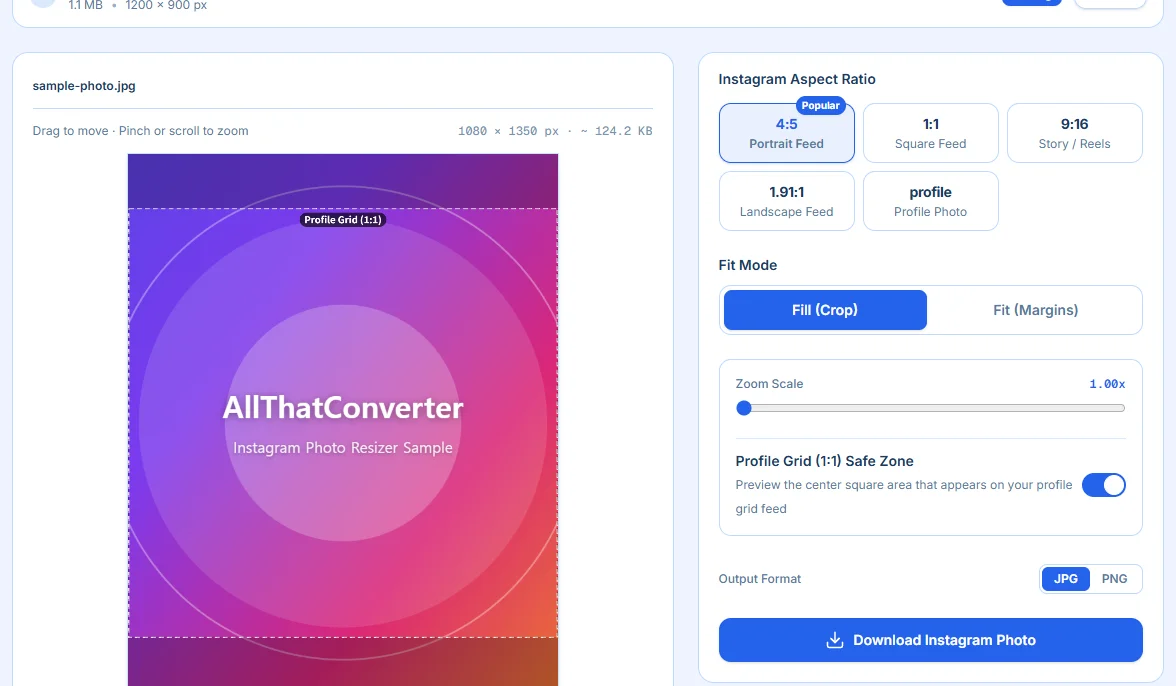
Because the 1:1 thumbnail cuts off the top 135 pixels and bottom 135 pixels of your 4:5 photo, subjects' foreheads get clipped, or key typography gets sliced in half. A messy grid turns new profile visitors away before they hit the Follow button.
AllThatConverter eliminates this guesswork with an innovative Real-Time 1:1 Profile Grid Safe Zone Guide:
- Dotted Safe Zone Overlay: While working in 4:5 mode, a dotted square overlay visually maps the exact 1080 × 1080 area that will appear in your profile grid.
- Effortless Framing: Simply pan or zoom the image with your mouse or finger so that faces, titles, and focal points stay safely centered within the dotted box.
- Clean Output: The dotted boundary lines are strictly a visual editing guide—the final exported image contains zero lines or artifacts.
3. Crop vs. Fit (No-Crop): Two Powerful Formatting Modes
Whether you want full edge-to-edge impact or complete preservation of your original composition, the tool offers dedicated workflows.
Mode A. Crop (Cover)
Fills the entire chosen aspect ratio seamlessly.
- Precision Zoom Slider: Smooth scaling from 1.0x up to 3.0x magnification.
- Smart Clamping Pan: Freely drag the photo in any direction. An intelligent boundary clamping engine guarantees you never accidentally leave unsightly blank seams or gaps at canvas borders.
- One-Click Reset: Instantly revert zoom and offsets back to default center positioning at any time.
Mode B. Fit (No-Crop & Aesthetic Margins)
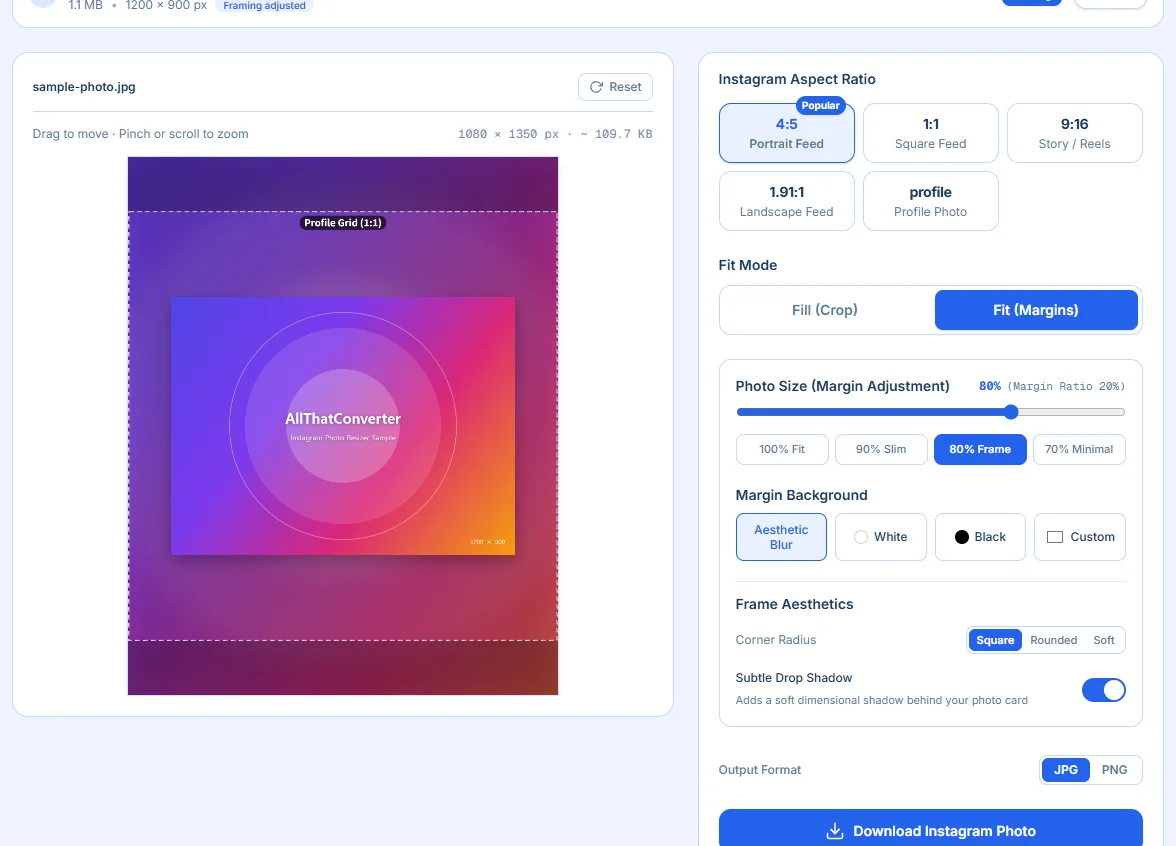
Preserves 100% of your original image without losing a single pixel. Perfect for wide landscape shots and group photos.
- Scale & Margin Sliders: Scale your image from 30% to 100% with four quick presets:
- 100% (Fill): Fits the longest edge directly to the canvas border
- 90% (Slim): Elegant 10% breathing margin
- 80% (Framed): Balanced magazine-style photo card
- 70% (Minimal): Generous 30% gallery exhibition border
- 4 Aesthetic Background Styles:
- Aesthetic Blur: Generates a soft, dreamy Gaussian blur using colors sampled from your original image—the gold standard look favored by top fashion and lifestyle influencers.
- Minimalist White: Clean, museum-grade white borders.
- Sleek Black: High-contrast frame suited for dark themes and night photography.
- Custom Color Picker: Choose any hex code or brand color to match your feed aesthetic.
- Card Detailing (Corner Radius & Drop Shadow):
- Rounded Corners: Choose None (0px), Medium (24px), or Large (48px) to soften rectangular edges into contemporary photo cards.
- Drop Shadow: Enable a subtle, realistic drop shadow to make the photo pop floating above the blurred background.
Pro Aesthetic Formula: The Magazine Look
Upload a horizontal landscape photo, choose the 4:5 Portrait canvas, switch to [Fit Mode + 80% Preset + Blur Background + Medium Radius + Drop Shadow]. You will get an editorial aesthetic worthy of a high-end publication with zero Photoshop skills required.
4. Carousel Batch Processing & ZIP Export
One of Instagram's most frustrating rules is its carousel constraint: the aspect ratio of your very first photo dictates the crop for every subsequent photo in the carousel.
If slide 1 is a 4:5 vertical photo, slides 2 through 10 are forced into 4:5—violently cropping wide images.
AllThatConverter solves this with Batch Carousel Management:
- Upload up to 20 Photos: Drag and drop your entire carousel set at once.
- Individual Custom Framing: Select any thumbnail in the list to customize zoom and pan independently. Modified images receive a helpful "Custom" indicator badge.
- "Apply to All" Button: Found the perfect zoom and positioning on slide 1? Replicate that exact framing across all 20 images with a single click.
- Real-Time File Size Estimation: An integrated background calculation shows expected output weights (~KB or ~MB) before you trigger an export.
- One-Click ZIP Download: Download images individually or bundle all resized photos into a single organized ZIP package ready for immediate mobile transfer.
5. Circle Mask Preview & High-Fidelity Formats
- Profile Avatar Circle Mask: Selecting the "Profile" preset automatically overlays a circular cutout preview, guaranteeing no important details or facial features get clipped by Instagram's circular avatar frame.
- JPEG & PNG Output: Choose between web-optimized 95% quality JPEG (perfect for keeping upload sizes lean without visual degradation) or lossless PNG (ideal for crisp graphics and typography).
6. Private by Design: 100% Client-Side In-Browser Processing
Most online converters secretly send your private files to remote servers. Transferring personal portraits, family photos, or client assets over third-party servers presents genuine privacy vulnerabilities.
Zero Server Uploads: Complete Client-Side Security
AllThatConverter operates entirely through client-side HTML5 Canvas and Web API rendering.
- Zero Network Transfer: Not a single byte of your photos ever leaves your device.
- Instant Processing: Zero queueing, zero upload waits, and instant local exports.
- Free Forever: No accounts, no subscriptions, and no hidden watermarks.
7. Simple 3-Step Workflow
- Add Images: Drag and drop one or multiple photos into the tool workspace.
- Pick Ratio & Mode: Select 4:5 Portrait (or 1:1, 9:16) and choose between Crop or Fit (with Blur).
- Align with Safe Zone: Adjust the crop while checking the dotted 1:1 safe-zone overlay.
- Export: Click Download or Download ZIP to save high-resolution 1080px assets directly to your device.
Instagram Photo Resizer & Cropper
Resize, crop, or fit photos with aesthetic blur margins for Instagram (4:5 portrait, 1:1 square, 9:16 story/reels) with 1:1 profile grid safe-zone preview.
Summary: Elevate Your Instagram Feed Aesthetic
Carefully framed proportions and harmonious feed layouts transform casual profiles into trusted digital brands. Stop fighting Instagram's automatic cropping—curate your feed with precision and ease using AllThatConverter Instagram Photo Resizer & Cropper.